Containers
uniTerm has a built-in container management interface supporting Kubernetes cluster management and the Docker / Podman / nerdctl / WSLC container runtimes. Manage cluster resources and container images on the local machine or on remote hosts over SSH.
Kubernetes
Connection Parameters
| Parameter | Description |
|---|---|
| Source | Local file (specify a kubeconfig path, with a file picker button) or Kubeconfig text (collapsed by default; click "Show Config" to expand and paste the content, with "Import from file" available) |
| Context | Select a context from the kubeconfig; click "Reload" to refresh the list |
| Namespace | The default namespace to view; check "All namespaces" to browse the whole cluster |
| Skip TLS verification | Skip API Server certificate validation (insecure, for self-signed test environments only) |
| SSH Tunnel | Optional. Access an internal cluster API through an SSH jump host |
After filling in the fields, click "Test Connection" to verify the kubeconfig and network reachability.
Cluster Overview
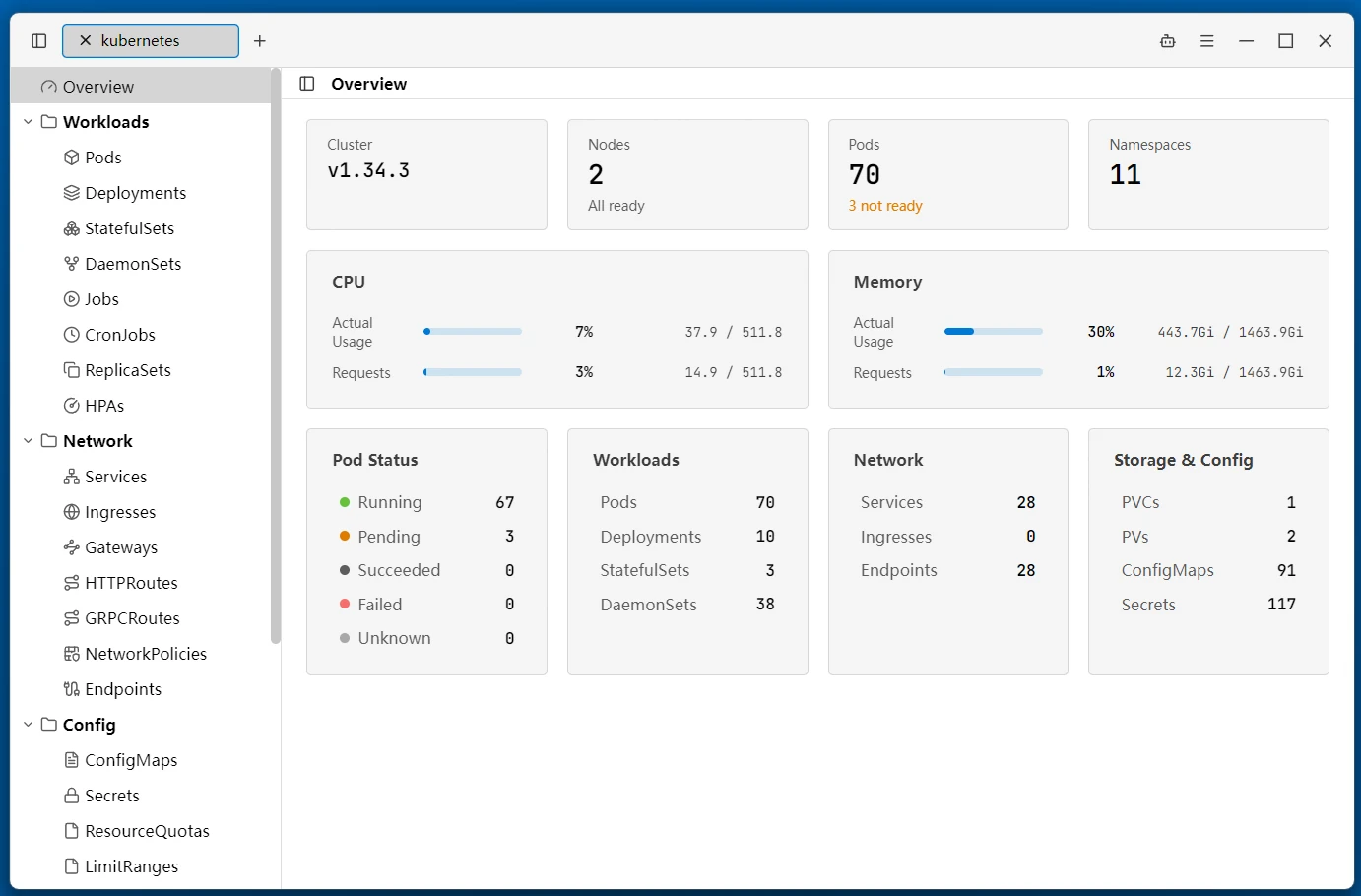
The connection opens on the cluster overview, showing the whole cluster at a glance:
- Cluster info — Kubernetes version, current Context, namespace count
- Nodes — Total node count and readiness (not-ready nodes highlighted)
- Resource summary — Counts of workloads / networking / storage & config resources
- Pod status — Distribution by run state
- Usage — Cluster CPU / memory actual usage vs. requests (requires metrics-server installed in the cluster)
- Recent events — Recent warning events; clicking a resource stat jumps to its resource list
Resource Browsing
The left tree panel groups cluster resources by category, watches for changes, and refreshes automatically:
| Group | Resources |
|---|---|
| Workloads | Pods, Deployments, StatefulSets, DaemonSets, ReplicaSets, Jobs, CronJobs, HPAs |
| Network | Services, Ingresses, Endpoints, NetworkPolicies, Gateways, HTTPRoutes, GRPCRoutes |
| Config | ConfigMaps, Secrets, ResourceQuotas, LimitRanges |
| Storage | PVCs, PVs, StorageClasses |
| RBAC | ServiceAccounts, Roles, RoleBindings, ClusterRoles, ClusterRoleBindings |
| Cluster | Nodes, Namespaces, Events, CRDs |
- Top filter — Filter in real time by name, status, namespace, and other columns
- Health highlighting — Not-ready Pods, under-replicated workloads, and NotReady nodes are highlighted row-wide
- Live metrics — Pod and Node lists show CPU / memory usage and its percentage of requests/limits (requires metrics-server installed in the cluster)
Resource Actions
After selecting a resource, the right-click menu or inline action buttons provide the following (varies by resource type):
- Detail — A side drawer shows the full metadata, Spec, Status, and other fields
- Edit — Edit the resource YAML directly and apply
- Create — Create resources from a built-in YAML template
- Scale — Change the replica count of a Deployment / StatefulSet / ReplicaSet
- Restart — Rolling-restart a workload
- View Pods — Jump to the Pod list associated with the workload/node
- Cordon / Drain — Mark a node unschedulable or evict its Pods
- Delete — Delete after confirmation, with optional force delete (skip graceful termination)
Pod Logs and Terminal
- Logs — Follow Pod logs in real time, with pause/resume, timestamps, previous container, auto-scroll, wrap, and clear
- Terminal — Exec directly into a Pod container for an interactive shell
Container File Browser
For running Pods, a dual-pane file browser can be opened to browse the container's filesystem directly, uploading / downloading files between local and container. Transfers are tracked in a task list (running / done / failed) — no need to run kubectl cp by hand.
Container Engines
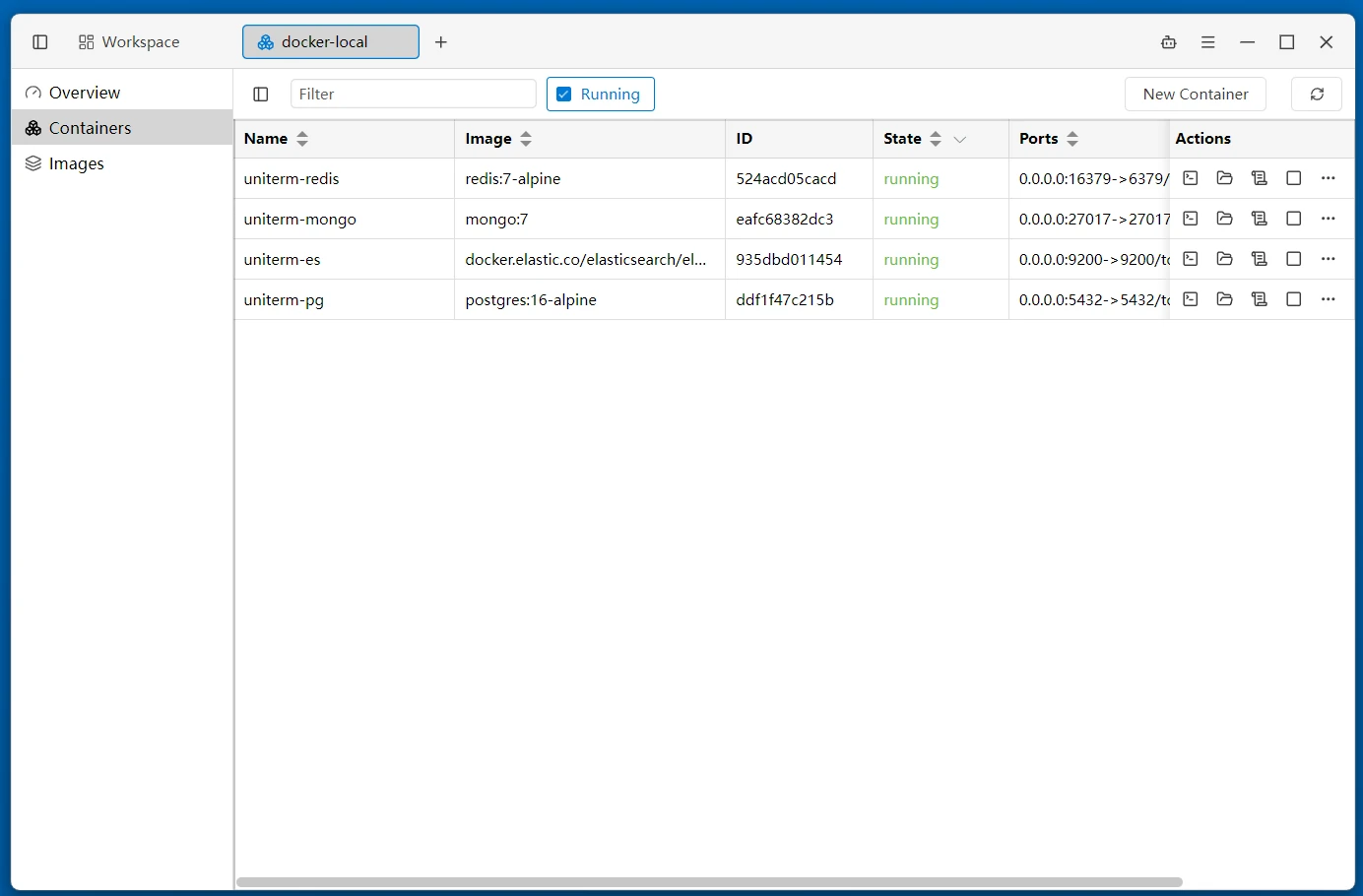
Four runtimes are supported: Docker, Podman, nerdctl (containerd), and WSLC (Windows WSL2 Container, Windows only). Choose the subtype when creating a new connection.
Connection Parameters
| Parameter | Description |
|---|---|
| Transport | Remote host (SSH) (default) reuses an existing SSH connection — inheriting its credentials and jump host configuration — to manage containers on a remote host; Local machine uses the container runtime installed on this machine |
| SSH Connection | When the transport is remote host, select a saved SSH connection as the channel |
nerdctl supports switching the containerd namespace from the top bar. The WSLC runtime does not offer the "Restart" or "Rename" actions; its image layers come from
image inspect(layer digests only — the CLI has nohistorycommand).
Container Management
The left tree panel switches between the "Overview", "Containers", and "Images" views.
The overview shows runtime and host info (client / server version, kernel, storage driver, CPU, memory) plus container and image counts.
The container list shows name, image, state, port mappings, and creation time, with the following actions:
- Lifecycle — Start, stop, restart, pause, unpause
- Exec — Enter an interactive terminal in the container
- Files — Open the container file browser to browse a running container's filesystem and upload / download files (same as the Kubernetes container file browser described above)
- Logs — View container log output
- Rename — Change the container name
- Remove — Remove the container after confirmation
- Detail — View overview, command, network, mounts, environment, and state
- New Container — Create a container by specifying image, name, port mappings, volumes, environment variables, restart policy, and command
Image Management
The image list shows repository, tag, ID, and size, and supports:
- Pull — Pull an image from a registry by name (e.g.
nginx:latest) - Remove — Remove the image after confirmation
Related
- Remote Terminal — SSH connection and jump host configuration
- Supported Protocols — Full protocol and port list